AI Product Photography Tools
How to Use MidJourney for Product Photography (2025 Guide + No-Prompt Workflow)
Learn how to use MidJourney for product photography—plus the 2-step workflow brands use to get accurate, cinematic product images with SCENE4, no retouching needed.MidJourney for Product Photography (2025 Guide + No-Prompt Workflow)
Nov 22, 2025
Content Index
How to Use MidJourney for Product Photography (Fast Overview)
TL;DR
You can use MidJourney for product photography—but not by forcing it to render your real products. The most effective 2025 workflow is:
(1) Use MidJourney to create cinematic, on-brand background scenes and lighting.
(2) Send that inspiration image into SCENE4, which becomes your “MidJourney for product shots”: it places your real product into the scene with correct scale, lighting, and realism—no prompts, no retouching, just one click.
Why MidJourney Is Powerful — But Not Made for Product Accuracy
MidJourney is still the gold standard for AI aesthetics: cinematic lighting, rich textures, editorial-grade composition. That’s why so many ecommerce brands, Shopify sellers, and DTC marketers wonder:
“Can I just use MidJourney for product photography?”
The honest answer:
Great for: moodboards, campaign ideas, backgrounds, visual concepts
Weak for: accurate logos, labels, product text, shape, and scale
Typical problems when you try to make real product photos in MidJourney:
Your bottle / box / sneaker doesn’t match the real object
Logos and labels are warped or unreadable
The product changes design across each variation
You spend hours on prompt trial-and-error and still end up in Photoshop
So instead of fighting MidJourney to be a product renderer, this guide shows you a better way:
Use MidJourney as your “scene director”, and let SCENE4 handle the real product photography.
What You Actually Need from AI Product Photography
If you sell physical products, “cool images” are not enough. The best AI tool for product photography has to nail three things:
Product detail accuracy
Correct logo, text, material, and proportions
No melted packaging or fantasy variants
Brand tone & storytelling
Visuals that feel like a real campaign, not random AI art
Consistent style across carousels, landing pages, ads, and PDPs
Speed & scalability
Minimal learning curve
Ability to generate campaign-level visuals in minutes, not days
Easy to create variations and test creatives for conversion
MidJourney alone checks the aesthetic box, but not accuracy or speed.
MidJourney + SCENE4 covers all three.
Framework: How to Use MidJourney Just for Product Scenes
Think of MidJourney as your AI set designer. Its job in this workflow:
Define theme, mood, background, storytelling
Set lighting style and camera angle
Not to draw your exact product
Step 1: Use MidJourney Search and Omni-Reference as Your Starting Point
Instead of writing prompts from scratch, use MidJourney’s own ecosystem:
Explore / Search
Type what you want:
“luxury dessert advertising photo”
“cinematic skincare flatlay soft daylight”
“streetwear sneaker campaign night city lights”
Browse results that match your vibe.
Open an image you like
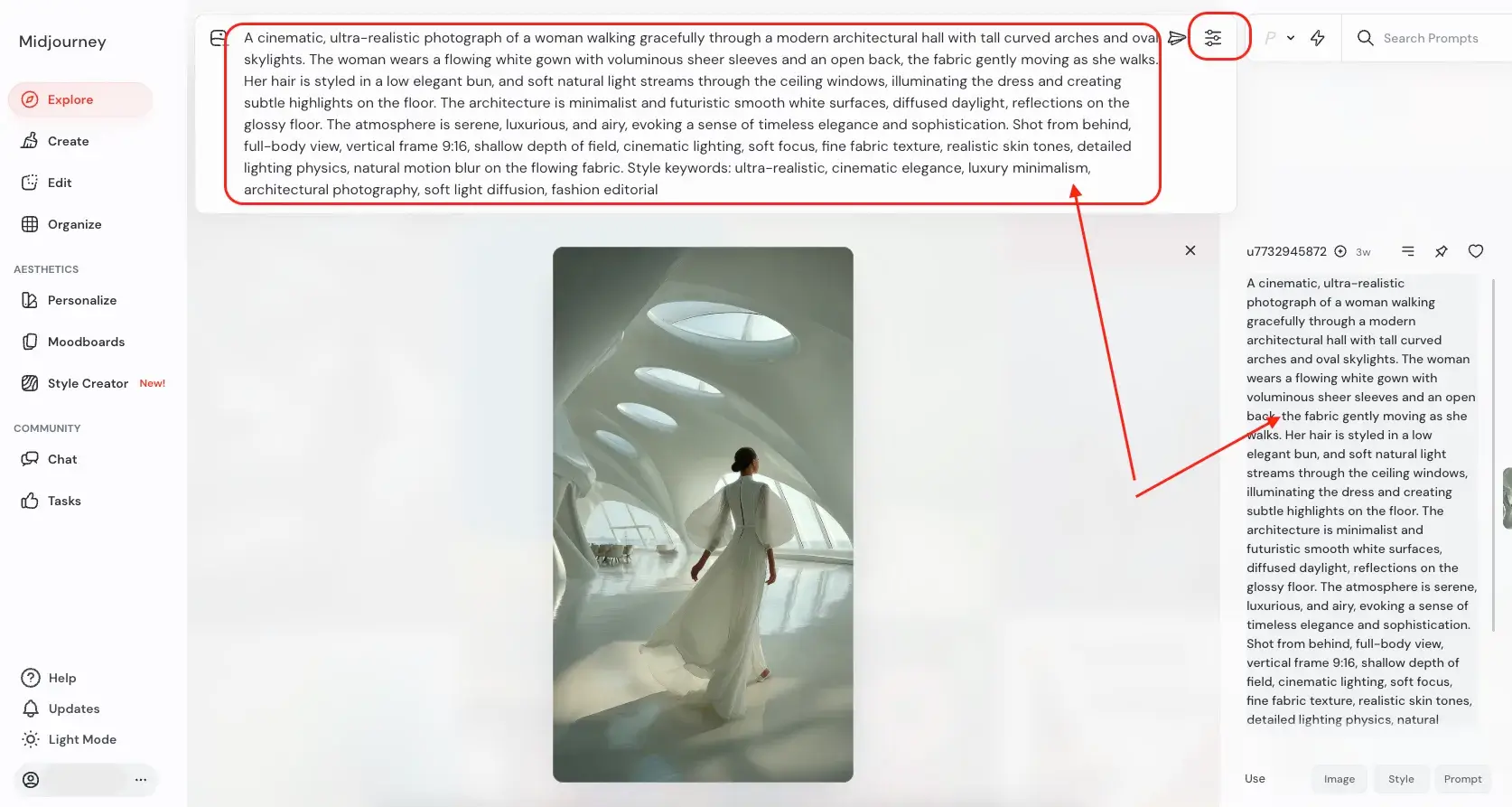
Click it → you’ll see the original prompt on the right.
This is your shortcut to a battle-tested prompt.
Reuse + tweak
Click Prompt to drop it into your bar.
Adjust a few phrases (colors, mood words, camera angle).
Optionally adjust Aesthetics / Settings (aspect ratio, stylization, etc.).
You now have a high-quality product background prompt in seconds.
Tip: If you care about running multiple scenes with a consistent look, use similar prompts + the same style settings (this is like a manual version of “omni-reference”).
Prompt Recipes: Product Mockup Prompts for MidJourney (with Explanations)
Below are prompt patterns you can adapt. Remember: we’re creating inspiration scenes, not the final product shot.
1. Dessert / Food Product
Prompt
cinematic close-up of an elegant dessert table in a luxury patisserie, golden ambient lighting, shallow depth of field, bokeh lights in the background, rich chocolate textures and glass displays, hyper-realistic 8k, shot on a 50mm lens, soft cinematic lighting, advertising photography, high contrast, detailed crumbs on the plate
Why it works
This prompt creates a close-up, cinematic scene that’s perfect for cakes, pastries, or chocolates. The “luxury patisserie” and golden lighting set a premium brand tone, while “shallow depth of field” and “50mm lens” create a realistic, commercial-photography look. You’ll later drop your real product into this world using SCENE4.
2. Skincare / Beauty Product
Prompt
premium skincare flat lay on marble countertop, soft window daylight, subtle shadows, glass bottles and jars, water droplets, fresh eucalyptus leaves, minimalist art direction, high-end beauty campaign, ultra realistic 8k, shot from above, gentle pastel color palette, cinematic but clean, product photography style
Why it works
This is ideal for product mockups in the skincare and cosmetics niche. The flat lay angle keeps things PDP-friendly, while the marble surface and natural light feel real and aspirational. SCENE4 will later place your actual bottle or jar onto this scene with accurate reflections and scale.
3. Sneakers / Streetwear
Prompt
dynamic scene of a sneaker on a city rooftop at dusk, neon reflections on wet concrete, dramatic backlighting, shallow depth of field, cinematic close-up shot midjourney style, ultra-detailed textures, 35mm lens, modern urban streetwear campaign, moody skies, subtle lens flare, editorial sports photography
Why it works
This captures the cinematic street energy popular in sneaker campaigns. The rooftop plus neon reflections give you movement and attitude, while the camera and lens details push MidJourney toward realistic product backgrounds you can reuse with SCENE4.
4. Tech Gadget / Electronics
Prompt
sleek product on a reflective black glass surface, soft rim lighting, floating particles of light, futuristic showroom interior, cool blue and purple gradients, ultra realistic 8k, studio product photography, close-up shot, high contrast edges, precise reflections, cinematic advertising style
Why it works
Perfect for phones, earbuds, watches, or accessories. The reflective surface and precise lighting work brilliantly when SCENE4 inserts your real hardware, preserving brand colors and finish.
5. Home Fragrance / Candle
Prompt
cozy cinematic living room scene, single candle on a wooden coffee table, warm golden light, soft bokeh from fireplace in background, velvet sofa, subtle smoke trail from the wick, shallow depth of field, lifestyle product photography, ultra realistic, 4:5 aspect ratio for social ads
Why it works
This blends lifestyle storytelling with product clarity, great for candles or home fragrance. SCENE4 later replaces or integrates your real candle in the same position, giving you ad-ready visuals instantly.
Lighting Styles That Work for MidJourney Product Scenes
Here’s how to think about lighting:
Soft window daylight
Use for: skincare, wellness, lifestyle home products
Keywords: soft daylight, window light, natural shadows, airy, clean
Cinematic low-key lighting
Use for: luxury fashion, jewelry, dark spirits, premium tech
Keywords: dramatic lighting, chiaroscuro, deep shadows, moody, cinematic
High-key studio lighting
Use for: catalog / PDP basics, transparent packaging, electronics
Keywords: studio lighting, seamless white background, evenly lit, no shadows
Golden hour outdoors
Use for: apparel, footwear, outdoor gear
Keywords: golden hour light, backlighting, warm glow, soft flare, sunset
Mention one lighting style explicitly in your prompt, and you’ll get a more controllable base scene for SCENE4.
The 2-Step Workflow: MidJourney Scene → SCENE4 Product Photography
Now we connect everything.
Instead of trying to get MidJourney to perfectly model your specific product, you:
Use MidJourney to create a cinematic inspiration scene
Feed that scene + your product image into SCENE4
SCENE4 then becomes your MidJourney for product photography: it understands the physics, scale, and usage of your real product and integrates it into the inspiration scene automatically.
Step 1 – Generate an Inspiration Scene in MidJourney
Step 2 – Turn That Scene into a Real Product Campaign with SCENE4
That’s it.
Then you can use:
Expand Campaign – variations in the same scene + tone
Expand Story – new scenes that keep the same campaign DNA (brand mood, styling)
This is where SCENE4 moves beyond “image generator” and becomes a campaign engine.
To illustrate the workflow, we are going to look at a case study together.
Real-World Case Study: Chocolate Cake Brand
To see how this actually works, let’s walk through a real example using a chocolate cake as the hero product.
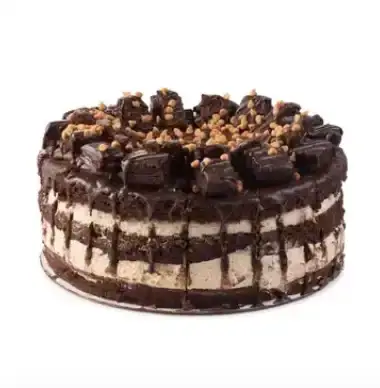
We chose this on purpose: food items are notoriously hard for AI tools to render accurately (texture, layers, toppings, crumbs). That makes it the perfect stress test for the MidJourney + SCENE4 workflow.
Challenge
Product: A rich, multi-layered chocolate cake
Goal: Create a premium, story-driven campaign series
Requirements:
Accurate cake texture, layers, and toppings
Magical, celebratory atmosphere
Multiple visuals that feel like one cohesive campaign
Step 1: Building the Inspiration Scene in MidJourney
1. Find an inspiration
In MidJourney, we explored terms like:
“cinematic dessert table, miniature pastry chefs, golden service bell, magical bakery, hyper-realistic advertising photo”
We used the Search function to find an existing image with:
Tiny pastry chefs
An ornate golden bell
Warm, dreamy bakery lighting
When we found a scene we liked, we:
Clicked the image to open it
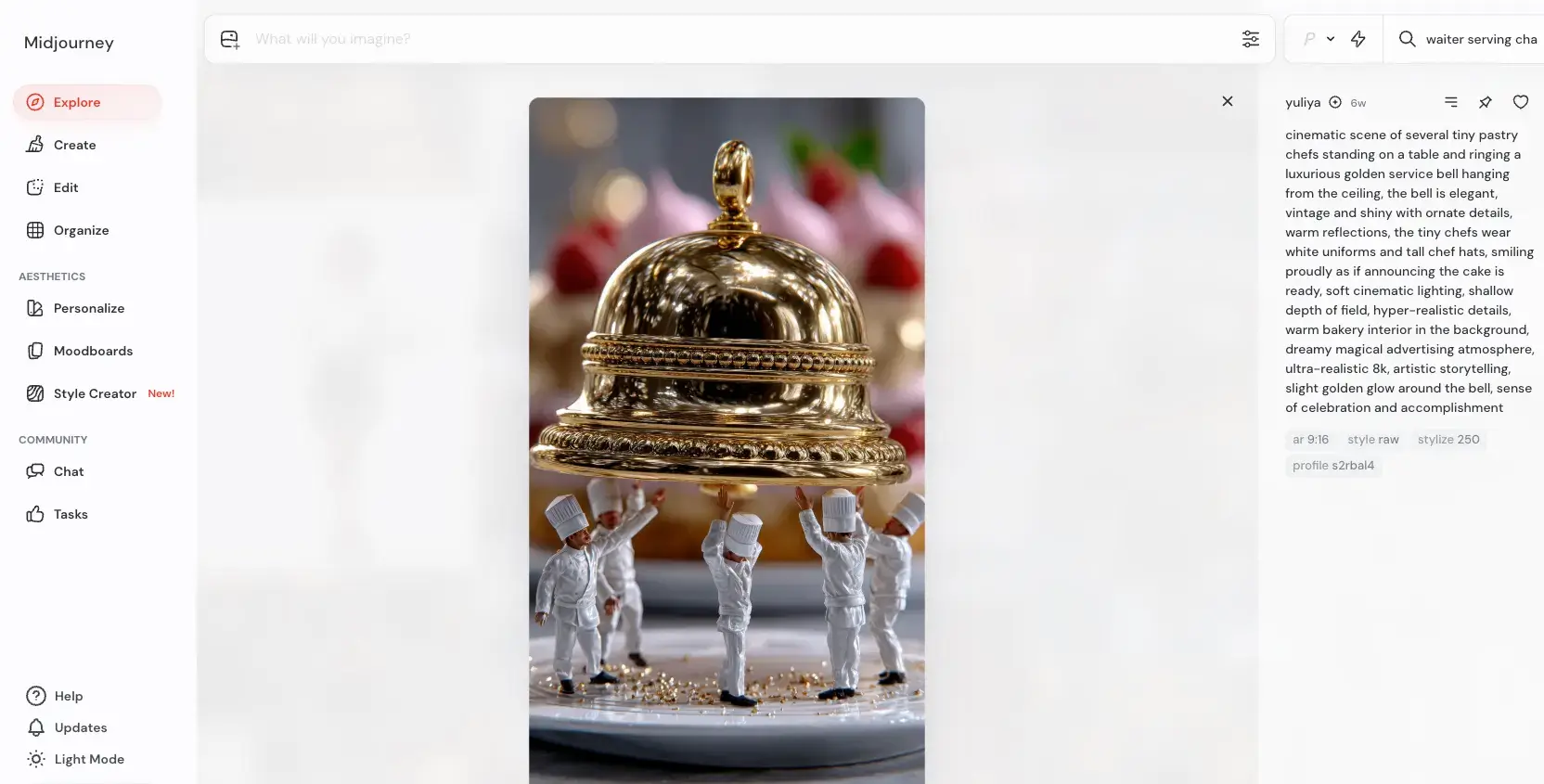
Clicked the prompt so it auto-filled the text bar
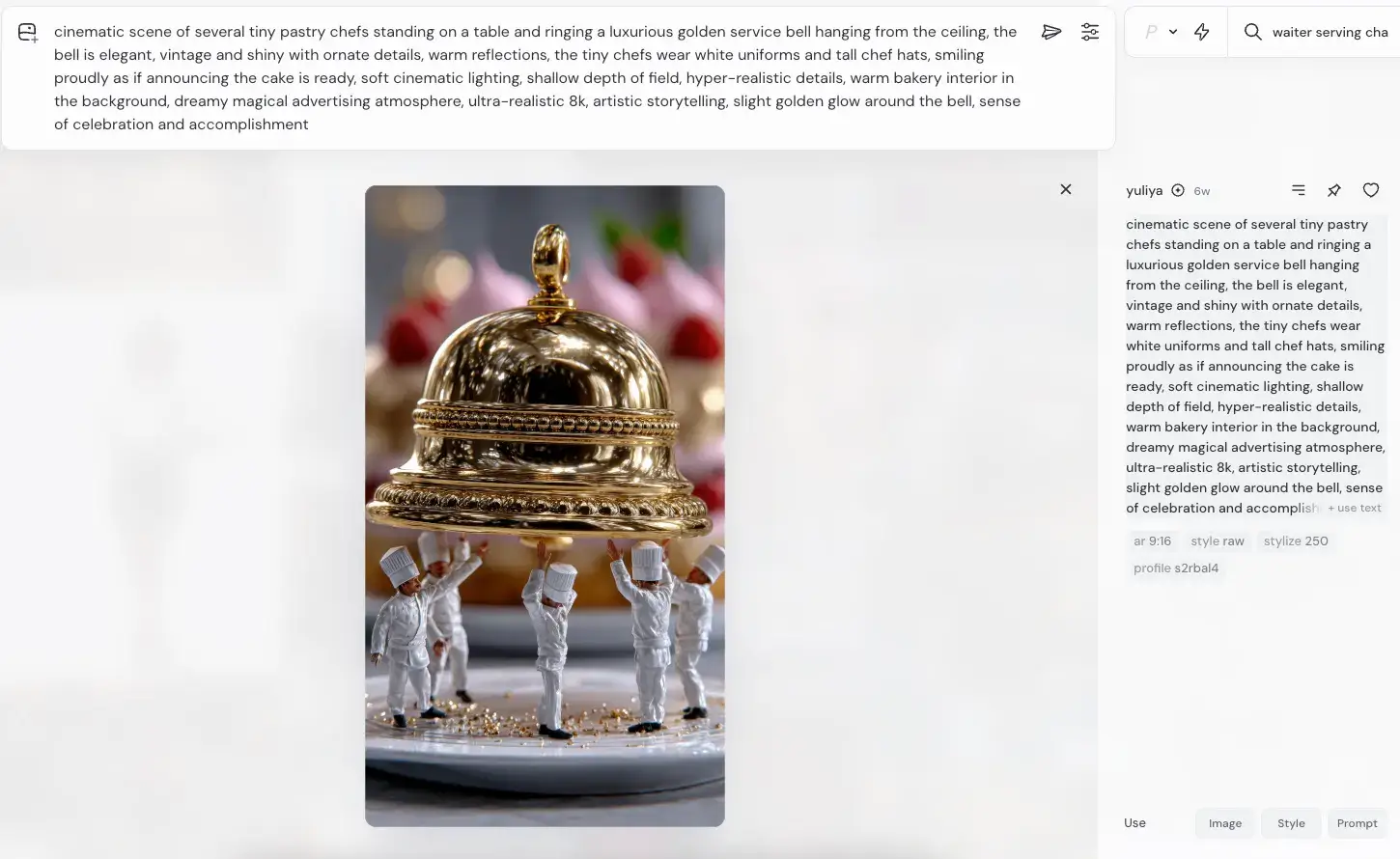
Opened the settings icon to:
Set aspect ratio for our intended usage
Control stylization so it stayed realistic
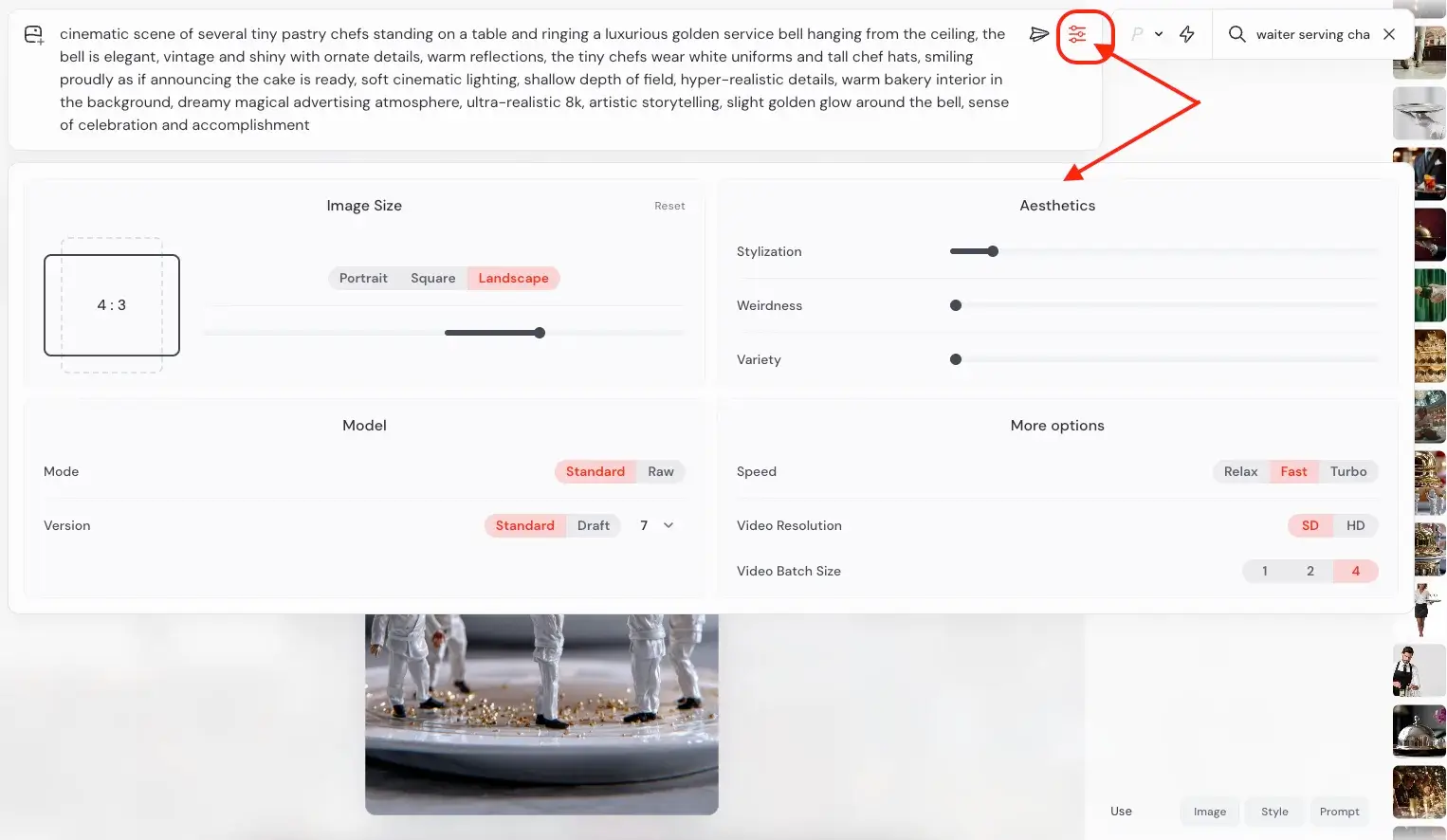
Hit Submit to generate our own custom version of that concept.
After a few renders, we picked a version with:
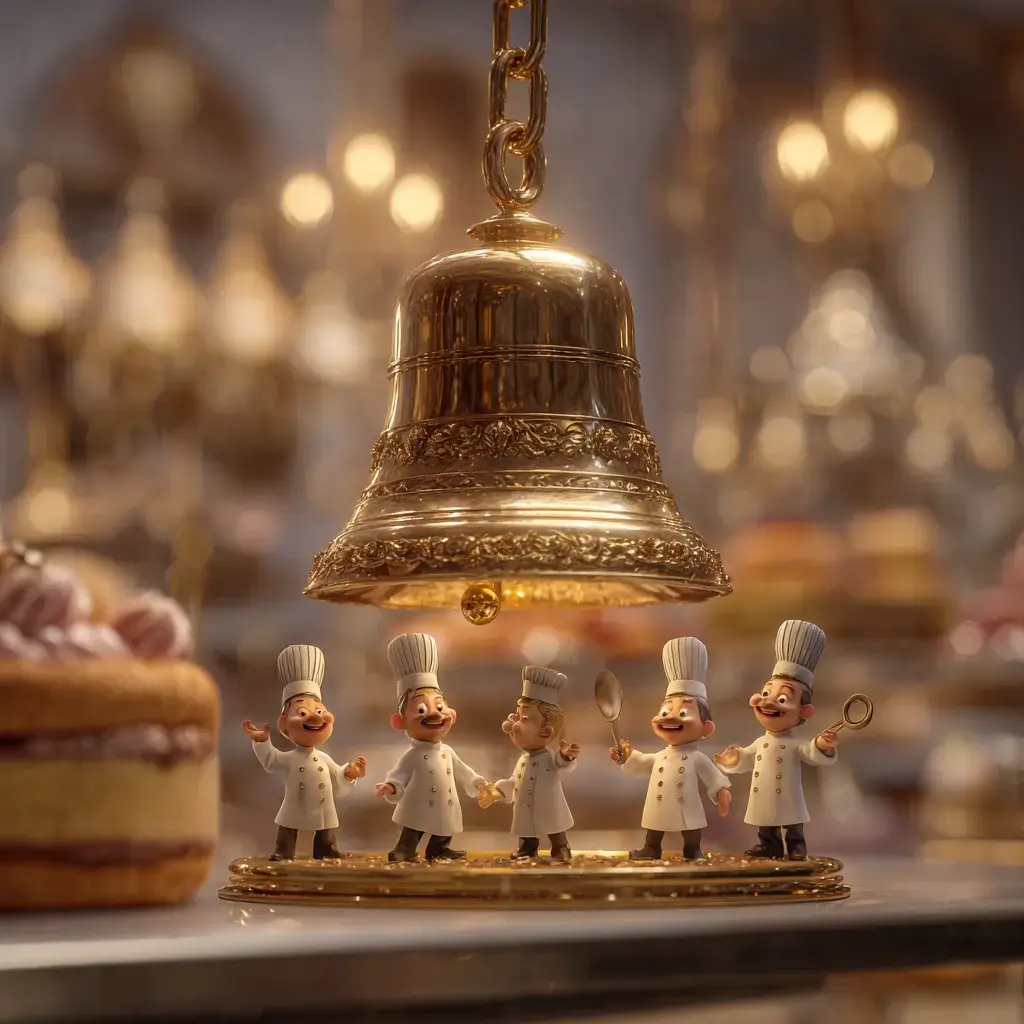
A luxurious golden bell
Tiny pastry chefs around the plate
Rich, cinematic background bokeh
We downloaded this as our MidJourney inspiration image.
Step 2: Turning the MidJourney Scene into a Real Campaign with SCENE4
Now we switch to SCENE4.
1. Upload inspiration via Custom Scene
Open SCENE4 → Custom Scene
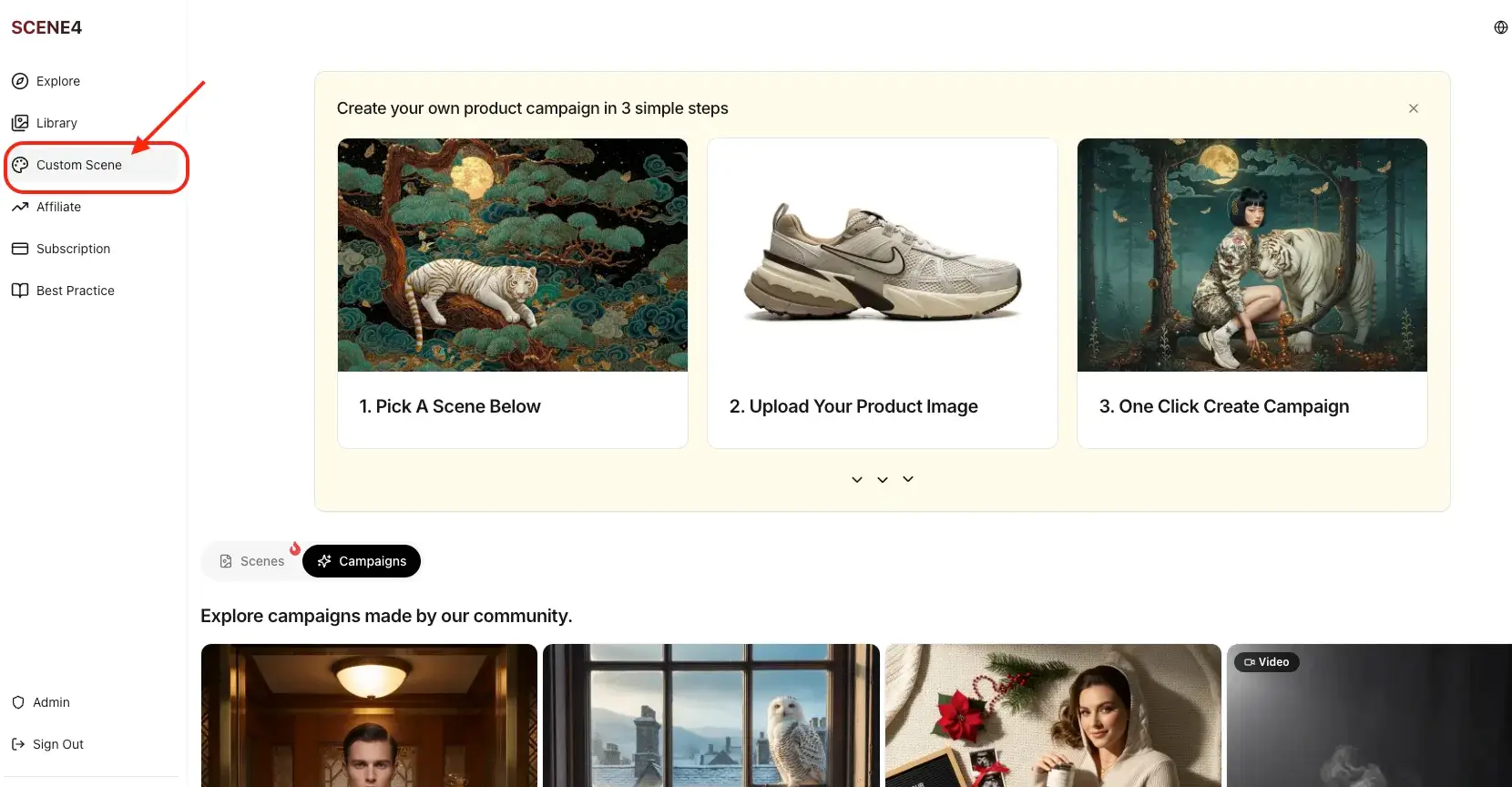
Upload the MidJourney inspiration image (bell + pastry chefs scene)
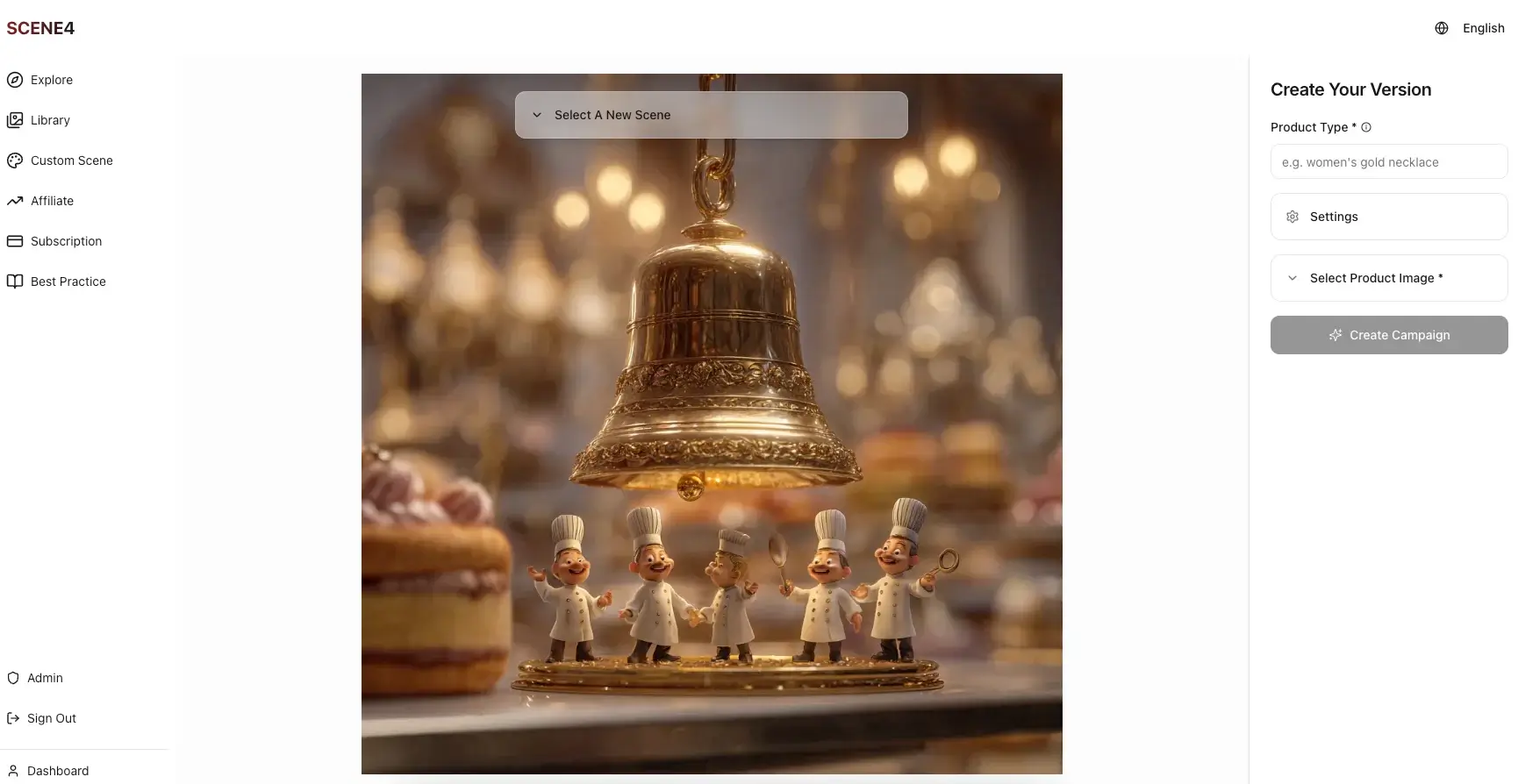
2. Add the real product
Set the product type to “chocolate cake”
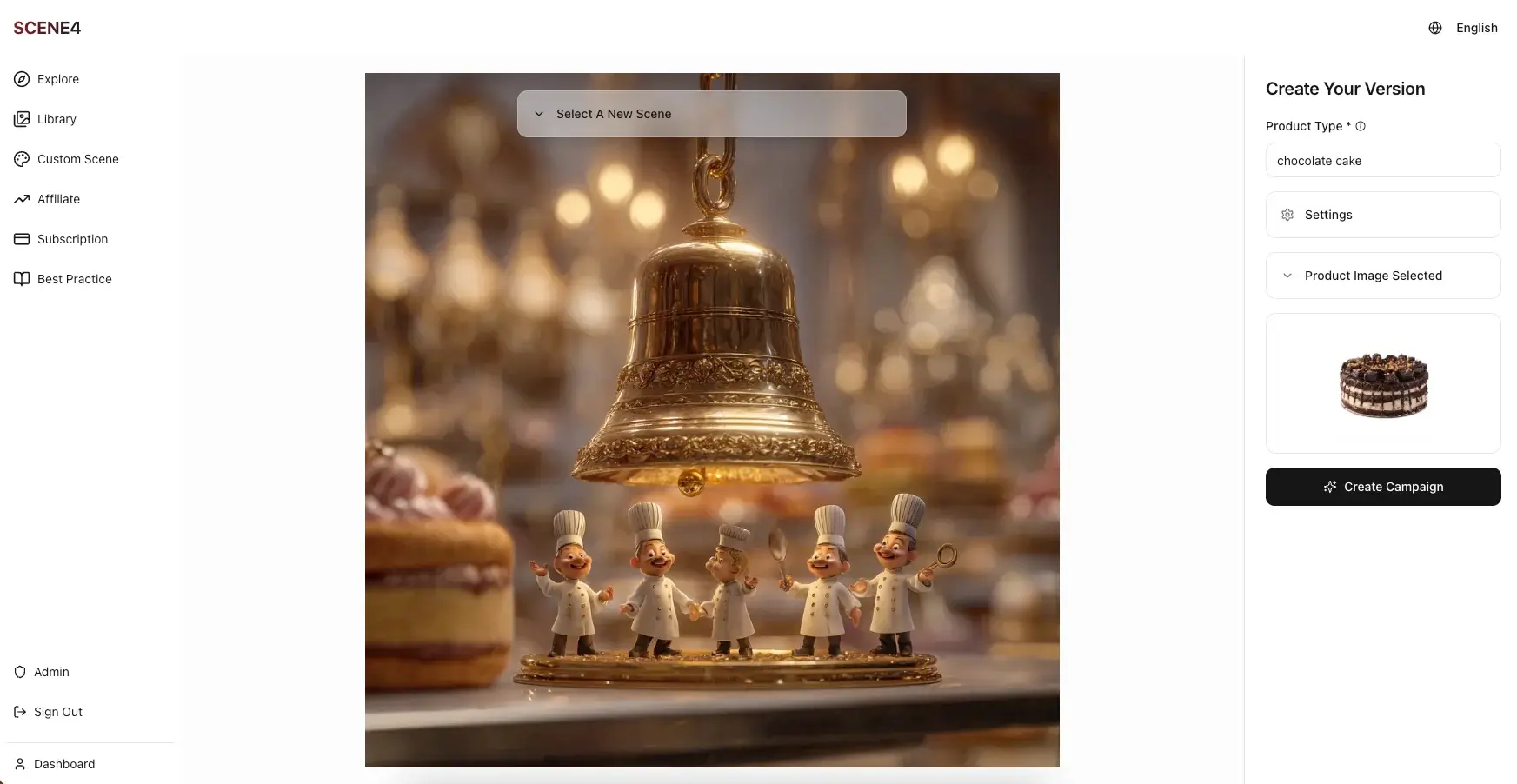
Upload the product photo (clean white-background image of our cake)
3. Click “Create Campaign”
That’s literally the only action required. No textual prompts, no omni-reference settings, no masking.
The Results: 4 Campaign Images, 100% Product Accuracy
Within minutes, SCENE4 generated a set of campaign visuals.
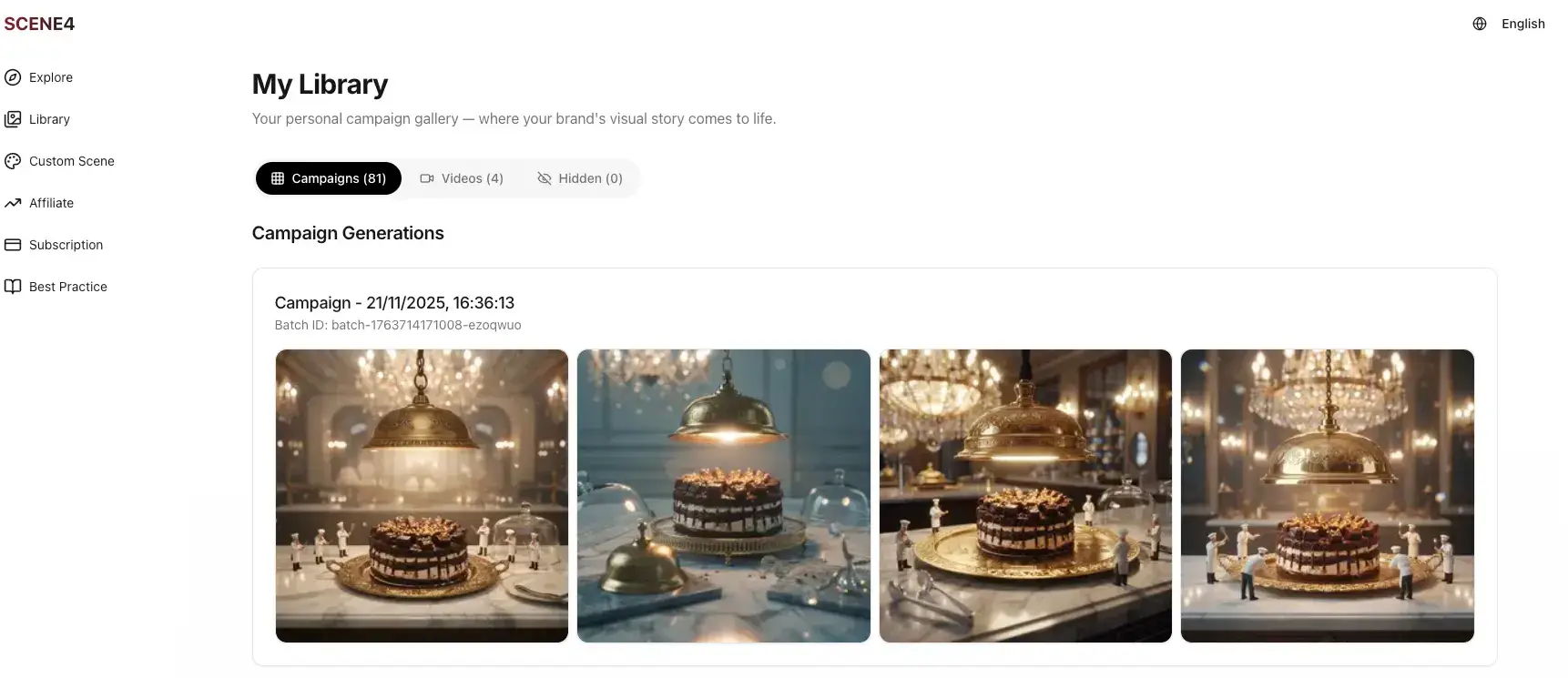
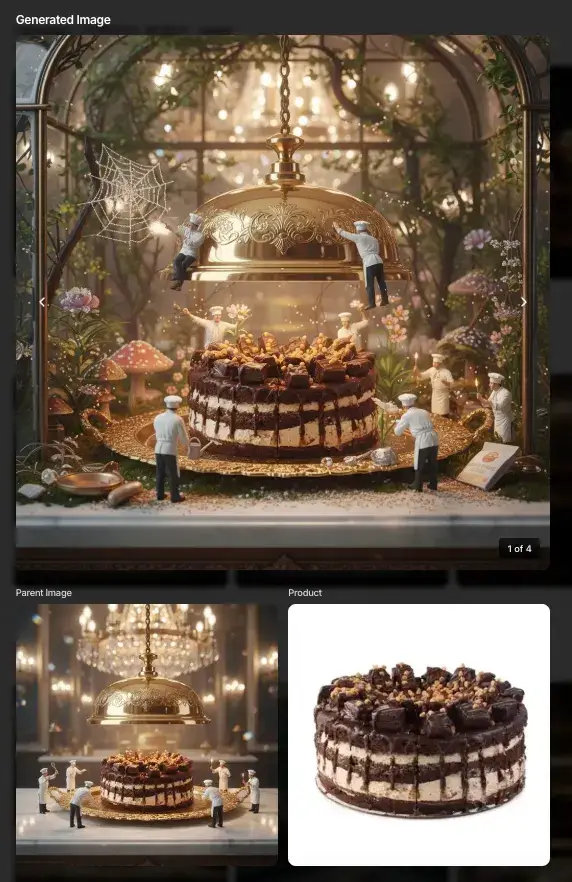
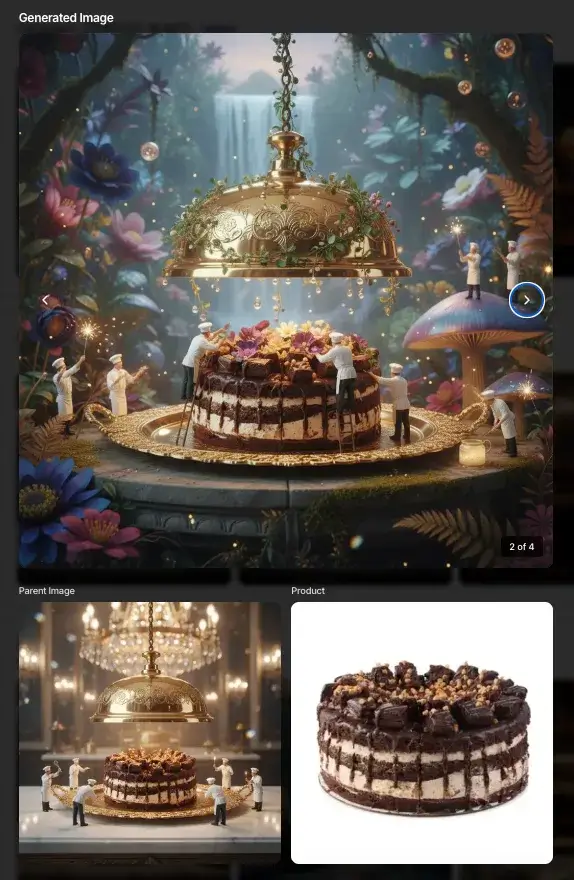
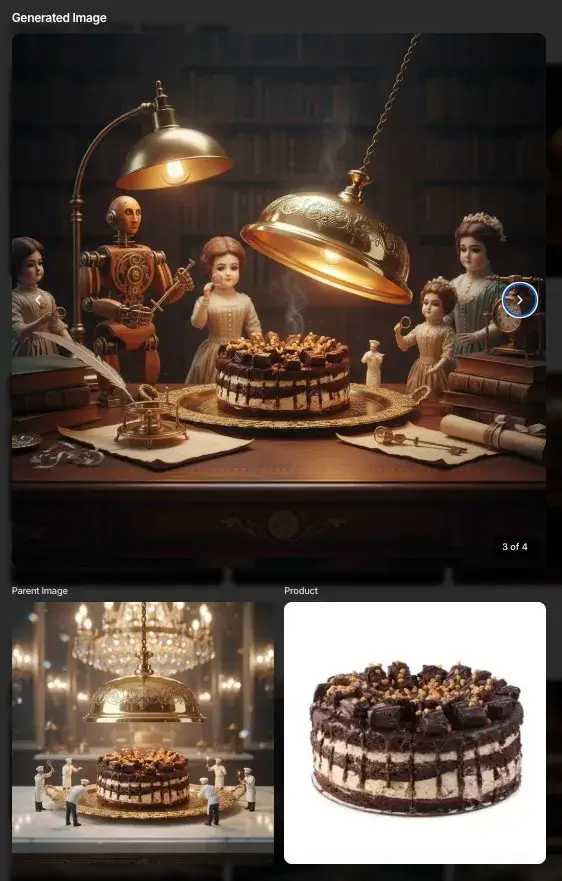
Let's look at some of the images in detail:
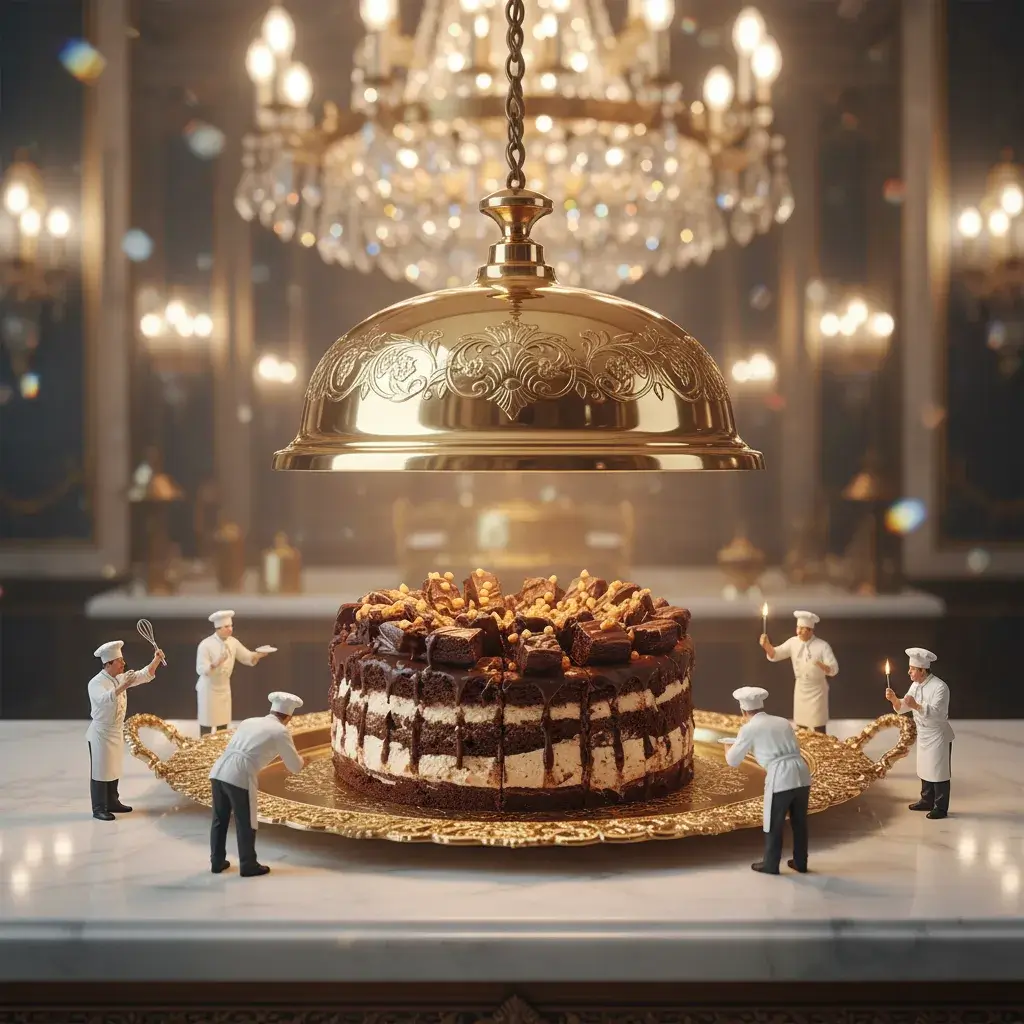
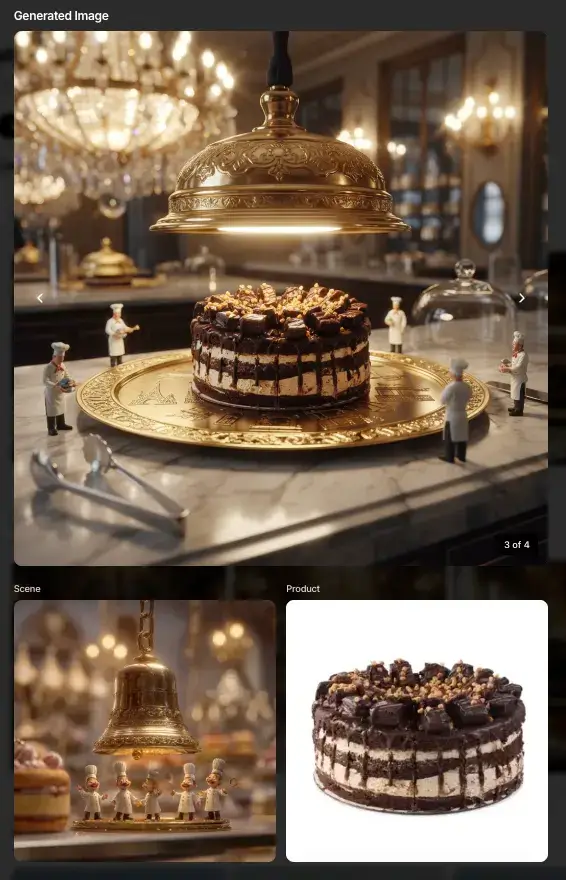
Key observations:
The chocolate cake appears exactly as in the original product photo
Same layers
Same topping density
Same overall proportions
The product is perfectly integrated into the MidJourney-inspired world:
Correct scale relative to the tiny pastry chefs
Correct lighting to match the golden ambient glow
Natural shadows and reflections on the serving tray
SCENE4 doesn’t simply paste the cake onto the image. It rebuilds the scene around the real product—matching perspective, lighting, and mood so everything feels native and believable.
The result looks like a high-budget dessert campaign shot in a real studio with props, stylists, and a full crew.
Expanding the Campaign with One Click
Now comes the part you truly cannot do inside MidJourney alone.
1. Expand Campaign – Infinite Variations, Same Scene
From one generated visual, we hit Expand Campaign.
SCENE4 produced additional images:
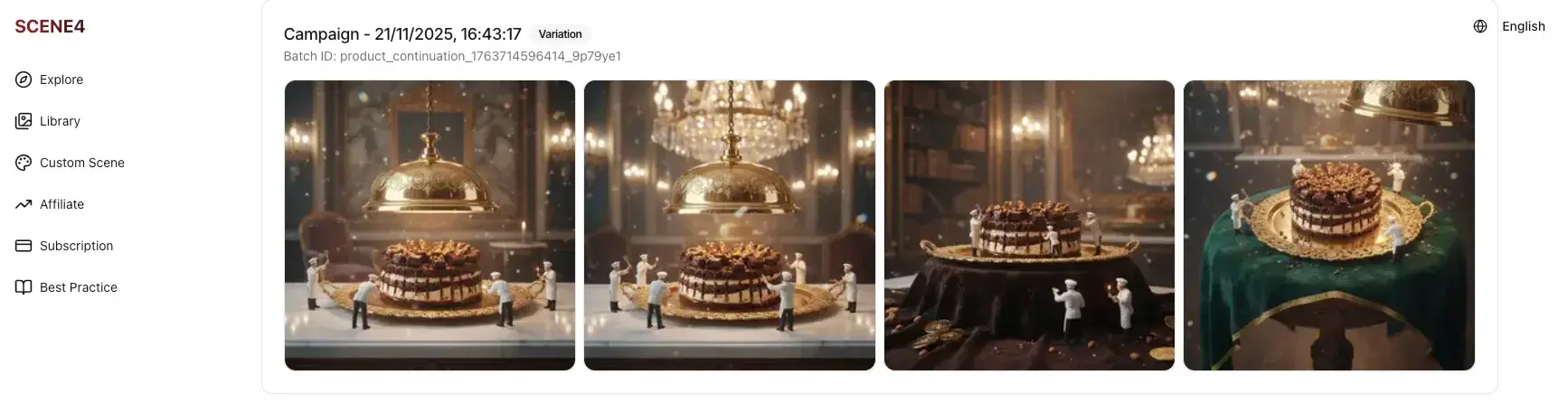
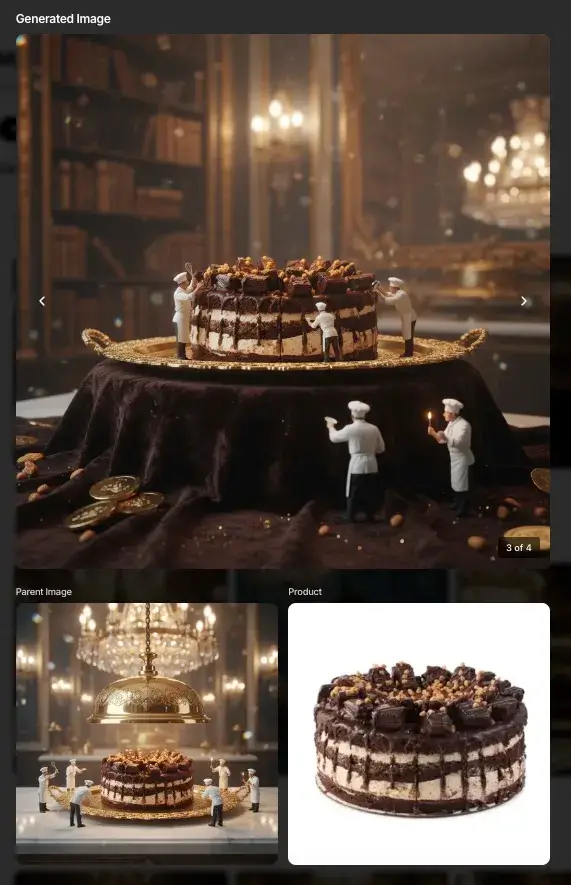
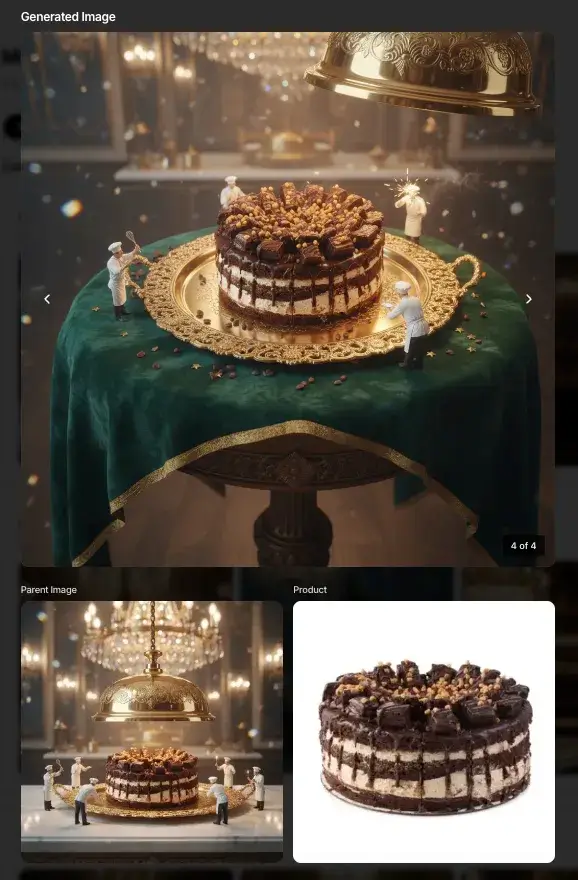
The cake stayed accurate and consistent
The surrounding scene evolved with new angles, different chef positions, new arrangements on the tray
The lighting and general mood stayed on-brand
This is perfect for:
Ad variations
Social media carousels
A/B testing creative angles
All done without touching a prompt.
And this could go on and on. You just need to click a button, and variation images would be created instantly.
2. Expand Story – Same Campaign DNA, New Environments
Next, we used Expand Story.
Here SCENE4:
Kept the same product accuracy
Preserved the “mini chefs + golden bell + magical world” DNA
Moved the cake into entirely new story setups, such as:
A library-like space with rich fabrics and candlelight
A whimsical forest conservatory with plants, webs, and fairy-tale atmosphere
A waterfall backdrop with lush foliage and glowing ambient lights
These are the images from Expand Story:
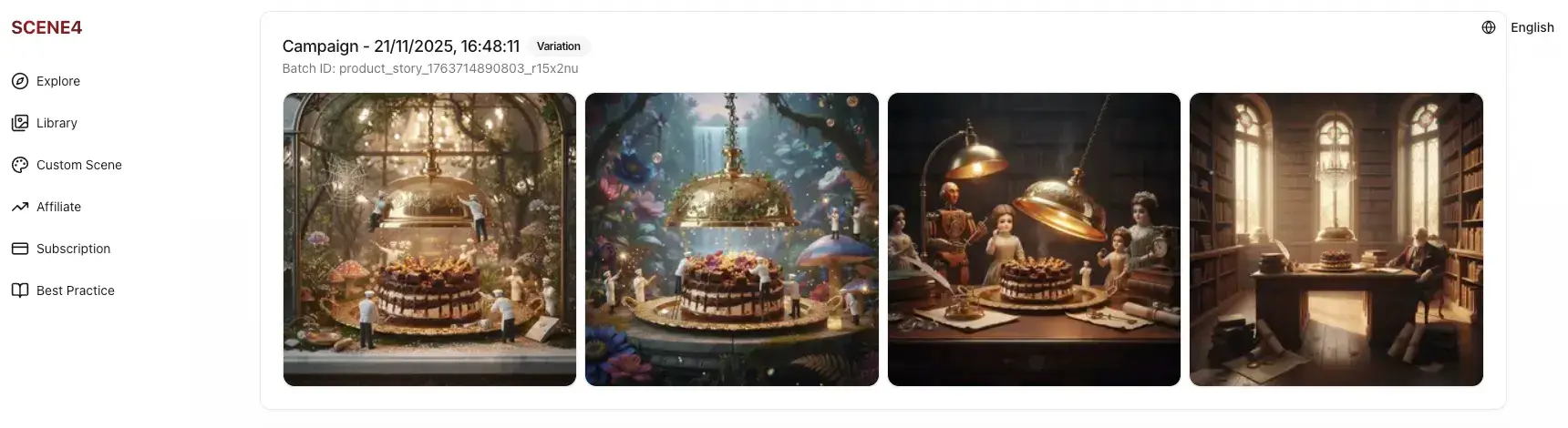
It felt like an entire seasonal campaign built from a single product photo and one MidJourney inspiration image.
No retouching.
No re-prompting.
No manual compositing.
And because each scene is generated directly from the initial concept, everything still feels like part of one coherent world—exactly what you want for brand storytelling.
One Click Video Generation
What's more? Yes, that is not all. SCENE4 is able to generate video in one-click too. You don't need to write prompt or script or anything at all. Just select your favorite image and click "Generate Video". A full creative video would be generated within minutes. Check below:

It would be ideal for social sharing, FB ads, IG ads etc.
Why This Workflow Beats “Pure MidJourney” Product Photography
Trying to do everything inside MidJourney usually leads to:
Inaccurate products (especially packaging, food, and anything with text)
Hours of prompt tweaking for each new angle
Inconsistent visuals across your ads, PDPs, and socials
The MidJourney + SCENE4 workflow flips that:
MidJourney does what it does best: cinematic scenes, imaginative worlds
SCENE4 does what ecommerce needs: real products, campaign logic, and scale
You get:
MidJourney-level aesthetics
Real-world product accuracy
A two-step workflow that non-technical marketers can actually use
Common Mistakes (and How to Avoid Them)
Mistake 1: Asking MidJourney to draw your exact product
You end up with:
Wrong label
Wrong bottle shape
Off-brand details
Fix: Use MidJourney only for the scene. Let SCENE4 handle your product.
Mistake 2: Over-complicating prompts
Long, messy prompts don’t guarantee better results.
Fix:
Use the search + reuse prompt approach. Start from proven prompts, adjust a few descriptors (brand tone, color, mood). Aim for clarity, not length.
Mistake 3: Ignoring aspect ratio and usage
You create beautiful scenes that don’t crop well for PDPs, 9:16 Reels, or 1:1 ads.
Fix:
Decide up front where the image will live. Set aspect ratio in MidJourney, then reuse those assets with SCENE4 so your final campaigns are plug-and-play.
When to Use MidJourney Alone vs. MidJourney + SCENE4
Use pure MidJourney for:
Moodboards
Concept art
Internal creative exploration
Inspiration decks
Use MidJourney + SCENE4 for:
Live ad campaigns
Ecommerce product photography
Social media carousels, Stories, Reels
Launch campaigns, email hero images, landing pages
If the image is meant to sell a real product, not just inspire, the hybrid workflow wins every time.
Quick FAQ
Q1. Can MidJourney replace my studio photos completely?
Not reliably for real ecommerce products. It’s fantastic for ideas and backgrounds, but it struggles with precise labels, logos, and consistent product shapes. That’s why we pair it with SCENE4.
Q2. Do I need to show my product inside MidJourney first?
No. In this workflow, MidJourney never needs to see your product. You generate only the background / scene in MidJourney, then SCENE4 integrates your real product from a simple product photo.
Q3. How much prompting do I need to learn for SCENE4?
None. All prompting happens (optionally) in MidJourney for the inspiration scene. Inside SCENE4, you simply upload the scene + product photo and click Create Campaign. Expand Campaign and Expand Story are also one-click.
Final Thoughts: Treat MidJourney as Your Art Director, SCENE4 as Your Production House
In 2025, the winning brands aren’t the ones who fight AI tools into doing what they weren’t built for. They’re the ones who orchestrate the right tools for the right jobs.
Let MidJourney design worlds, moods, and cinematic atmospheres.
Let SCENE4 transform those worlds into accurate, ad-ready product photography in a single click.
If you sell products online and you’ve ever looked at a luxury campaign thinking, “I wish my product could look like that”—this workflow finally makes it possible, without agencies, studios, or prompt wizardry.
Art Direction Automated
Because creativity should move at the speed of imagination. SCENE4 made that possible.
Art Direction Automated
Because creativity should move at the speed of imagination. SCENE4 made that possible.
Art Direction Automated
Because creativity should move at the speed of imagination. SCENE4 made that possible.